Download
Please download the CompuSyn installation file and run to install the program. Java installation file is optional if no errors after installation; for detail instruction on how to use the CompuSyn program, download the User Guide.
• CompuSyn installation file: Install CompuSyn.msi
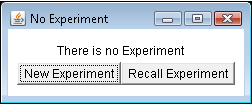
"When you download the installation file: CompuSyn msi, you may receive security warning from browser, (e.g., Internet Explore Smart Screen Filter) saying “CompuSyn.msi is not a commonly downloaded software”; you should elect the options to Save or Run anyway to proceed downloading and installation. In addition, after download, you may need to have administration rights to install, if you don’t have, please request assistance from your local Help Desk or System Administrator to install CompuSyn into your office computer. Once the installation is completely successfully, you should see the CompuSysn icon showing up on your computer’s desktop. Open the program, you will see small window like this. If there is an error messging saying “Run Time Error”, please refer to Troubleshooting section below to install Java.

• Java file to be installed: Install Java.exe (Only if needed)
• User Guide: Users Guide.pdf
• Troubleshooting for CompuSyn Installation (Only if needed)
Installation of CompuSyn and Java is very simple. Usually it takes a minute or two. In rare cases, the installation is not successful probably because the newer Java in your Window may prevent the installation of CompuSyn’s older Java. If you use very new version of Window 7, you can take the following steps:
- First check if your computer has Java 5.0 or 6.0, if it does, please remove these files by going to: Control Panel – Programs and Features – highlight Java program that you wish to remove and press uninstall on top.
- Install CompuSyn software normally by clicking setup and follow the direction.
- CompuSyn icon will appear on your desktop screen, double click on the icon and CompuSyn will start.
- If your computer asks you for Java updates afterward, please do so. After installation of CompuSyn, you can go back to www.Java.com and install the latest Java version. This update or installation will not affect your CompuSyn software to work properly.